
Face Detection and Tracking with OpenCV and Arduino
A real-time system that drives two servos on a pan-tilt mechanism to keep a detected face near the center of the camera frame.
About the Project
This project tracks a face seen by a camera with a two-axis pan-tilt mechanism. A Python application locates the face inside each frame, while an Arduino applies the calculated horizontal and vertical angles to two servo motors, turning the camera toward the target.
The system does not identify a person. It performs face detection with OpenCV’s Haar cascade classifier and tracks the geometric center of the detected region.
Goal
The goal is to build a complete control path between image coordinates and physical movement: measure how far the target is from the frame center, convert that error into motor-angle corrections, and redirect the camera toward the face.
How It Works
- The Python application opens a USB camera through
VideoCapture(1)and converts every captured frame to grayscale. haarcascade_frontalface_default.xmlextracts face regions withdetectMultiScale(..., 1.3, 4).- The center of the detected rectangle is compared with the frame center. Horizontal pixel error is divided by 18 and vertical error by 25 to produce approximate servo corrections.
- The face position determines the direction of both axes. Corrections below the configured threshold of two are treated as a dead zone.
- Commands update roughly every 0.4 seconds. The X-axis angle is encoded as a negative integer and the Y-axis angle as a positive integer over a 115200-baud serial connection.
- Arduino reads each value with
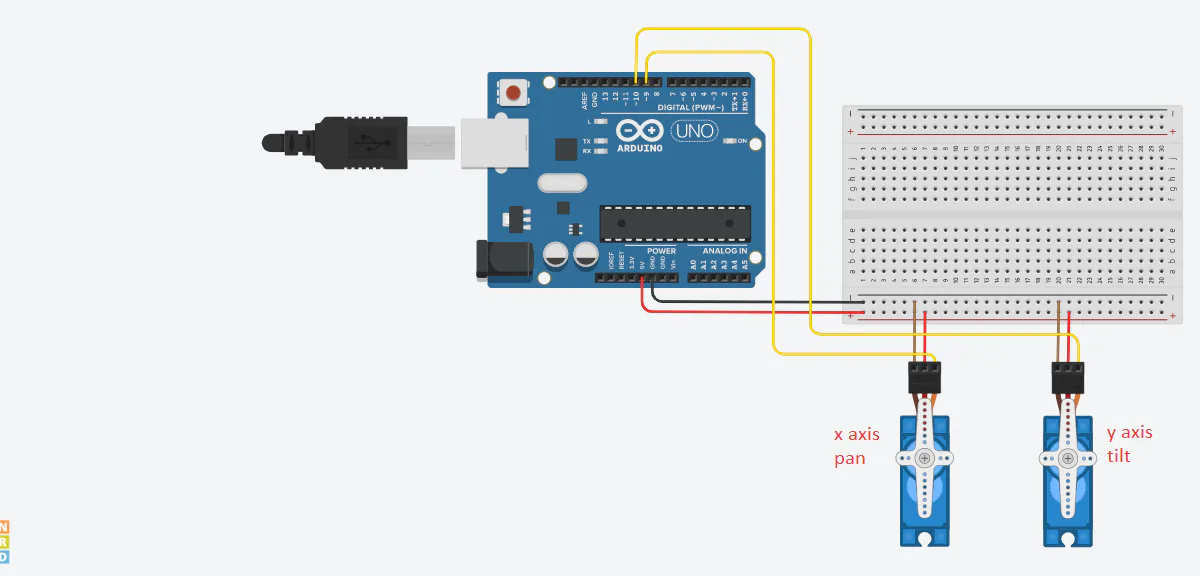
Serial.parseInt(). Negative values update the horizontal servo on pin 9; positive values update the vertical servo on pin 10.
Red guide lines show the detected face center, while a yellow line visualizes the error between the face and frame centers. Pressing q exits the capture loop.
Technologies
- Python: camera loop, coordinate calculations, and control-command generation.
- OpenCV: capture, grayscale conversion, Haar-cascade detection, and tracking overlays.
- PySerial: 115200-baud transport between Python and Arduino.
- Arduino C++: serial protocol parsing and servo target updates.
- Servo library: angle control for the pan and tilt motors connected to pins 9 and 10.
Project Structure
face_detection_tracking.py: capture, face detection, center-error calculation, and serial commands.x_y_servo/x_y_servo.ino: firmware that routes incoming axis/angle values to the two servos.Pan-Tilt.png: project image showing the mechanical pan-tilt arrangement.
Technical Highlights
- Haar-cascade face detection on a live camera feed
- Two-axis error calculation between target and frame centers
- A small-motion dead zone and 0.4-second command interval
- Axis selection encoded through the sign of each integer
- Real-time overlays showing tracking error and correction direction
Hardware
- Arduino
- Two servo motors
- USB camera
- Breadboard and wiring
- Two-axis pan-tilt mechanism
Setup and Usage
Install the Python dependencies:
pip install opencv-python pyserialAfter uploading the Arduino sketch, update the COM3 port and VideoCapture(1) camera index for the local machine. Place the OpenCV Haar-cascade XML file in the working directory, then run:
python face_detection_tracking.pyTechnical Notes
The code tracks the first detected face and processes only one target per frame because the face loop ends with break. Servo angles are not clamped in software, so adding limits based on the physical mechanism would improve long-running operation. The fixed scaling divisors and command interval can also be tuned for different servo speeds and camera geometry.